Delete Your Account
We're sorry to see you go. If you've decided to delete your account, this page will guide you through the process. Please note that account deletion is permanent and cannot be undone.
What Gets Deleted
When you delete your account, the following information will be permanently removed:
- Your account information and profile data
- All your messages and conversation history
- Your relationship data and preferences
- Your chat channels and all associated data
Important: This action is irreversible. Once your account is deleted, we cannot recover any of your data.
How to Delete Your Account
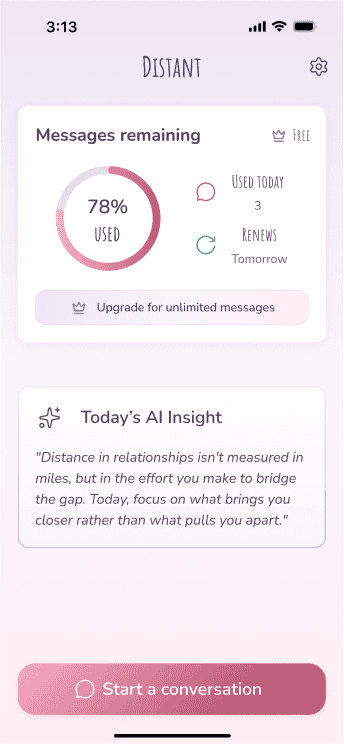
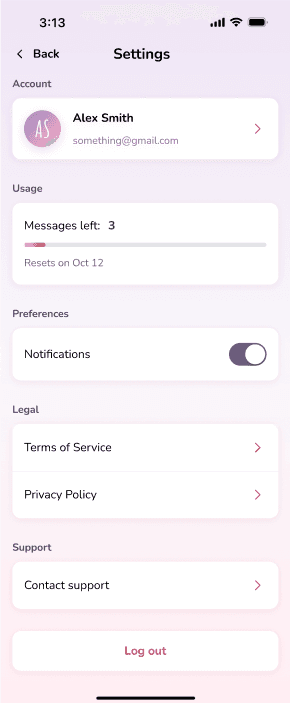
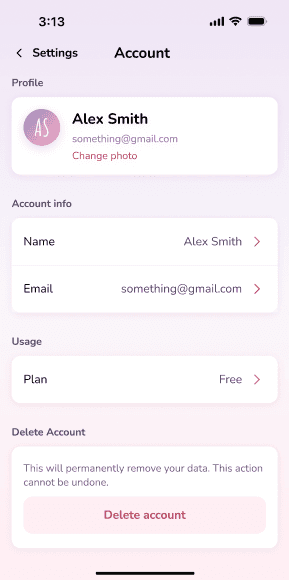
To delete your account, follow these steps in the Distant mobile app:
- 1Open the Distant app and navigate to the home screen. Click on the settings on the top right
- 2Click on your Account
- 3Click on Delete account
Need Help?
If you have questions about account deletion or need assistance, please don't hesitate to reach out. You can contact us via email at team@getdistant.com, and we'll get back to you as soon as possible.
Thank you for using Distant. We appreciate the time you've spent with us, and we're here to help if you need anything.